
NES.emu (NES Emulator)
Robert BrogliaArcade
4.3637.00 Reviews
- Version
- Varies With Device
- Installs
- 100.00K
- Age Rating
- Everyone
Screenshots
Our Review of NES.emu (NES Emulator)
 Analysis by Appyee
I enjoy returning to NES games in short bursts: a few minutes with a familiar platformer can feel more inviting than starting a large modern game. NES.emu is an arcade game built around emulating the original Nintendo Entertainment System, and its main appeal is straightforward: it gives me a way to play compatible NES games on a phone. It is made by Robert Broglia, costs $3.99, and is rated Everyone. Its 4.4 average from around 2.8 thousand ratings and more than 100 thousand installs suggest that plenty of players are interested in this focused, paid approach to retro gaming.
The appeal of a dedicated NES emulator
The important thing to understand is that this is an emulator, not a collection of games. That distinction shapes the whole experience. I need to bring game files I’m entitled to use, then open them in the app; there isn’t a built-in catalogue to browse when I’m looking for something new. For someone who already keeps a personal library of NES titles, that separation can be useful: the app is a tool for playing, rather than a storefront or a curated retro subscription.
That focused design also means the first question is practical, not nostalgic: do I already have compatible files, and am I comfortable organizing them on a phone? If yes, the basic idea is appealing. If I expect to install one app and immediately browse a library of included classics, this is the wrong fit. I’d choose a legitimate collection that supplies its own games instead, even if it offers less flexibility about which titles I can access.
How the controls change a phone session
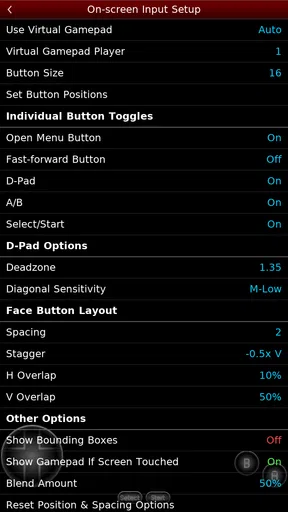
Touch controls make the phone convenient, but they are still a compromise for games designed around physical buttons. The on-screen controls can be adjusted, which matters more than it may sound: a layout that feels fine in a slow puzzle game may become awkward when a platformer asks for quick jumps and directional changes. I’d spend a minute arranging the buttons before judging a game, and keep the layout simple enough that my thumbs don’t cover the action.
A Bluetooth controller is the better choice when I want longer sessions or more precise input. It brings the experience closer to playing on a console, but it also makes the setup less spontaneous: I need the controller charged and paired, and I’m no longer just pulling out my phone for a quick break. Save states help bridge that gap. I can preserve a point in a game and return later, which is handy when a level demands practice or real life interrupts. I’d still keep ordinary in-game saving in mind where a title offers it, rather than treating a save state as a universal replacement.
Where it fits into an ordinary day
For me, the strongest use case is a short, deliberate session: I’m waiting for an appointment, have a compatible game ready, and want to replay a familiar level without carrying a separate console. I can load the game, use touch controls for a casual attempt, and stop when I need to move on. If I’m settling in at home for a longer run, I’d connect a controller and use save states to make progress easier to resume.
This is also a good fit for someone who enjoys exploring old games rather than merely sampling a preselected set. The trade-off is that the player takes responsibility for finding and managing game files. That adds a small amount of setup before the fun begins, and it is worth keeping a tidy folder system so a growing collection stays easy to navigate. I’d use clear filenames and keep a separate backup of files I’m allowed to use; an emulator is not itself a backup plan.
Getting Started with NES.emu
First things first, let's talk about the setup. Installing NES.emu is a breeze. It’s available on both Android and iOS, so no worries about compatibility. Just head over to your app store of choice, and with a few taps, you're ready to start your retro journey. The app itself is lightweight, so it won't hog your phone's precious storage space. Now, that's a win!
Once it's installed, you might wonder about game ROMs. The app doesn’t come with games pre-installed, so you’ll need to get your hands on ROMs. Thankfully, the app supports a wide range of file types, including .nes and .zip, making it super flexible. Just load your ROMs into the app, and you’re set for hours of pixelated fun.
User Experience and Interface
Now, onto the user interface. NES.emu keeps things simple, which is exactly what you want when diving into classic games. The interface is straightforward and intuitive, focusing on getting you into the game as quickly as possible. You’ll find all the necessary controls without any clutter, which is a huge plus in my book.
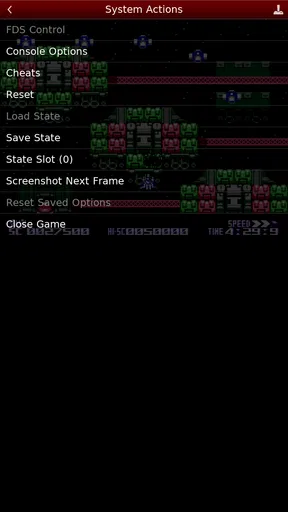
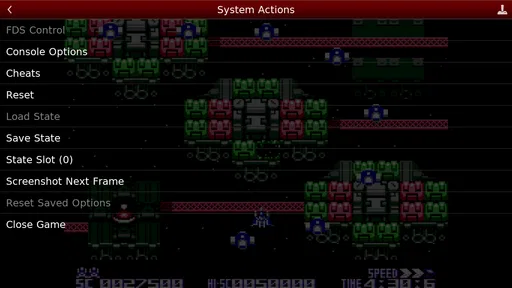
Speaking of controls, they’re fully customizable. You can tweak on-screen buttons to your liking, or better yet, connect a Bluetooth controller for that authentic gaming experience. It’s like having a mini NES console right in your pocket. The emulator also supports save states, so you can pick up right where you left off, perfect for those tricky levels that need a bit more practice.
Performance and Compatibility
Performance-wise, NES.emu doesn’t disappoint. Games run smoothly with no noticeable lag, and the sound quality is spot on, perfectly capturing those nostalgic chiptunes. Whether you’re on a high-end device or an older model, the emulator adjusts accordingly to deliver optimal performance.
Compatibility is another area where this emulator shines. It supports a vast library of NES games, so whether you’re into Super Mario Bros, The Legend of Zelda, or any other classic, chances are you'll be able to play it. The app even includes options for graphical enhancements if you’re feeling fancy and want to spruce up those 8-bit graphics a bit.
Practical trade-offs before you pay
The $3.99 purchase makes sense to me if I expect to use an emulator regularly and already have games to load. It is less compelling as an impulse buy for someone who only wants to revisit one title once. The paid app also asks me to do more of the legwork than an all-in-one retro collection: choosing files, keeping them organized, and deciding which controls suit each game. That flexibility is worthwhile for enthusiasts, but it is not automatically more convenient.
One useful habit is to test a game for a few minutes before committing to a long session. Check that the file opens, that the controls feel comfortable, and that the sound is at a level you can live with in your surroundings. If a game is hard to play on glass, try moving or resizing the virtual buttons before assuming the game itself is the problem. If the title depends on precise timing, a paired controller may be a better use of the app than repeatedly fighting the touchscreen.
Another trade-off is the difference between a save state and a game’s own save system. A save state is convenient for pausing at an arbitrary moment, but it belongs to the emulator experience rather than the original game’s intended progression. I treat it as a practical pause button, not as proof that every title’s normal save behavior will be identical. For a long adventure, I’d use the game’s own save points when available and keep save states for interruptions or experimentation.
Choosing between this and other ways to play
Compared with a physical NES and original cartridges, a phone emulator is much easier to carry and can make a personal game library accessible in small gaps in the day. The compromise is tactile: virtual buttons do not feel like a classic controller, and a phone is not the same as sitting in front of a television. A Bluetooth controller closes some of that gap, though it adds equipment and pairing to the routine.
Compared with a general-purpose emulator, a dedicated NES option is appealing when I mainly want to play games for this one system without turning the phone into a broader emulation project. A general-purpose alternative may suit someone who wants to manage several older systems in one place. Compared with a subscription or official retro collection, NES.emu offers a different kind of choice: I bring the games rather than browsing a supplied catalogue. The best option depends less on which sounds more powerful and more on whether I value a ready-made library or control over my own files.
Before buying, I’d ask myself two simple questions: do I have compatible game files I can use, and will I play often enough to appreciate a dedicated emulator? If the answer to both is yes, the setup is easy to justify. If either answer is no, an official collection with games included is a smoother place to start. This also helps set expectations about what the app does: it provides the playing environment, while the library and the way I organize it remain my responsibility.
Performance and compatibility
Performance-wise, NES.emu doesn’t disappoint. Games run smoothly with no noticeable lag, and the sound quality is spot on, perfectly capturing those nostalgic chiptunes. Whether you’re on a high-end device or an older model, the emulator adjusts accordingly to deliver optimal performance.
Compatibility is another area where this emulator shines. It supports a vast library of NES games, so whether you’re into Super Mario Bros, The Legend of Zelda, or any other classic, chances are you'll be able to play it. The app even includes options for graphical enhancements if you’re feeling fancy and want to spruce up those 8-bit graphics a bit.
Who will get the most from it
I’d recommend this to players who already know which NES games they want to revisit, have legitimate files ready, and appreciate a focused tool more than a ready-to-play catalogue. It is also a good match for people willing to tune touch controls or use a controller so the phone suits the game, rather than expecting every title to feel perfect immediately. The age rating is Everyone, so the content rating is broad; the more important decision is whether this style of setup fits the player.
I’d skip it if I’m new to retro games and mainly want a guided way to discover classics, or if I don’t want to manage game files at all. I’d also choose a physical console or a controller-first setup if touch input frustrates me and I’m planning long sessions. For a casual player with a ready library, though, the portability and quick resume potential make it an easy way to fit a little NES time into an ordinary day.
Final Thoughts
In conclusion, NES.emu is a fantastic emulator that captures the essence of retro gaming perfectly. It’s user-friendly, performs well, and offers a seamless experience for both casual players and hardcore retro enthusiasts. Whether you’re looking to relive childhood memories or discover what gaming was like in the 80s, this app has got you covered.
So, what are you waiting for? Grab your favorite ROMs, download NES.emu, and dive into the world of classic gaming. Trust me, you won’t regret it!
Verdict
Strengths of NES.emu (NES Emulator)
- High compatibility with NES games.
- Supports save and load states easily.
- Customizable on-screen controls.
- External controller support available.
- Minimal lag for a smooth experience.
Limitations of NES.emu (NES Emulator)
- May require BIOS files for some games.
- Interface feels outdated to some users.
- Limited support for cheat codes.
- Occasional crashes on older devices.
- Ads can disrupt gameplay immersion.
Other Releases by Robert Broglia
View All
Snes9x EX+
Arcade4.2

MD.emu (Genesis Emulator)
Arcade4.2

GBA.emu (GBA Emulator)
Arcade4.3

NEO.emu (Arcade Emulator)
Arcade3.4
Similar Picks in This Category
View All
Subway Surfers
SYBO Games4.6

Stickman Party 234 MiniGames
PlayMax Game Studio4.6

Subway Princess Runner
Ivy4.4

Temple Run
Imangi Studios4.2

Zombie Tsunami
Mobigame SAS4.6

Stack Ball - Crash Platforms
CASUAL AZUR GAMES4.5
Frequently Asked Questions
What is NES.emu and how does it work?
NES.emu is an advanced emulator that allows users to play classic Nintendo Entertainment System (NES) games on Android and iOS devices. It replicates the original console's hardware, enabling you to load and play ROM files of NES games. Users can enjoy customizable controls, save states, and various display options to enhance their gaming experience.
Is NES.emu compatible with all NES games?
NES.emu supports a wide range of NES games and is compatible with most ROM files. However, some games may not run perfectly due to differences in emulation accuracy. It's important to use legally obtained ROMs to ensure compatibility and avoid potential legal issues. Always check the emulator's updates for improved game support.
What are the key features of NES.emu?
NES.emu offers a variety of features including customizable on-screen controls, support for Bluetooth/USB gamepad, save and load game states, and shader support for enhanced graphics. It also provides options for adjusting sound quality and display settings. These features make it a versatile choice for retro gaming enthusiasts.
How user-friendly is NES.emu for beginners?
NES.emu is designed with a user-friendly interface, making it accessible even for those new to emulators. The app includes easy-to-navigate menus and straightforward controls. While there may be a slight learning curve in setting up and configuring the emulator, numerous guides and community support are available to assist beginners.
Are there any legal concerns with using NES.emu?
While using NES.emu itself is legal, downloading and using ROMs without owning the original game can infringe on copyright laws. Users should ensure they are using ROMs from legal sources or have the original cartridges. It's crucial to respect intellectual property rights to avoid any legal issues.
Play our best games!


